


Key Takeaways
- Manage better WordPress defaults from one plugin by simplifying the admin, improving security, optimizing performance, and personalizing settings.
- Clean and focused admin experience by removing dashboard clutter and streamlining workflows for teams and clients.
- Safer and leaner WordPress setup by disabling unused features and applying essential security improvements.
- Easy to control and fully reversible with toggle-based settings and the ability to reset everything to defaults anytime.
New Plugin Alert!
We recently released a new WordPress plugin called Better By Default at Multidots. Aimed at improving how WordPress works out of the box, this plugin focuses on four core areas that most site owners eventually customize anyway:
- Simplifying the admin interface
- Applying essential security improvements
- Improving performance by removing unnecessary features
- Personalizing WordPress for better usability and branding
Instead of using multiple plugins or custom code, Better By Default provides a single control panel to manage these improvements safely and consistently.
Better by Default
What the Better By Default Plugin Does
Better By Default gives administrators structured control over WordPress defaults.
You can use it to:
- Clean up the WordPress dashboard and admin menus
- Apply basic security hardening with simple toggles
- Improve admin and site performance by disabling unused features
- Personalize the WordPress admin and login experience
- Improve everyday workflows for editors and administrators
All settings are grouped logically and can be enabled, disabled, or reset at any time.
Who Should Use This Plugin?
Better By Default is built for teams and site owners who want control without complexity.
It is especially useful for:
- WordPress site owners who want a cleaner admin interface
- Agencies managing multiple client websites
- Content teams and editors who prefer distraction-free workflows
- Developers who want better defaults without repetitive custom code
- Organizations that need branded or white-labeled admin experiences
Plugin Structure and Settings Overview
From the admin interface, Better By Default is organized into clear sections:
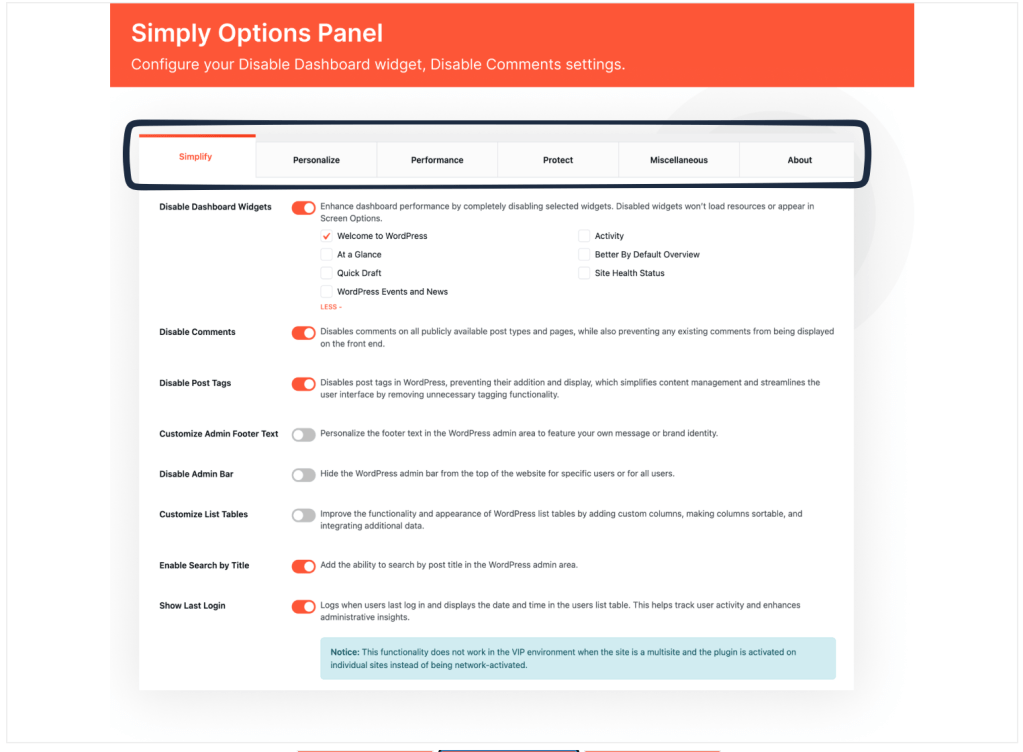
Plugin Structure and Settings Overview
This structure makes it easy to understand what each setting affects and avoids overlapping controls.
- Simplify: Clean and Focus the WordPress Admin
The Simplify section is designed to remove clutter and reduce unnecessary admin features.
| Feature | What It Does | Why It Matters |
|---|---|---|
| Disable Dashboard Widgets | Disable specific dashboard widgets such as Welcome, Quick Draft, Activity, Site Health, and News | Improves admin performance and reduces distraction |
| Disable Comments | Disables comments across all public post types and pages | Ideal for marketing or corporate sites |
| Disable Post Tags | Removes post tags entirely | Simplifies content management |
| Customize Admin Footer Text | Replace default footer text with custom branding or messaging | Useful for agencies and internal tools |
| Disable Admin Bar | Hide the admin bar for specific users or all users | Cleaner frontend experience |
| Customize List Tables | Add sortable columns and improve admin tables | Faster content and user management |
| Enable Search by Title | Adds title-based search in admin | Faster navigation for large sites |
| Show Last Login | Displays user last login date and time | Better user monitoring and audits |
Every disabled feature reduces visual noise and background loading. This makes WordPress easier to use for editors and safer for client handoffs.
- Personalize: Branding and Workflow Customization
The Personalize section allows you to adapt WordPress to match your brand and workflow.
| Feature | What It Does |
|---|---|
| Admin Color Branding | Customize base, text, accent, icon, highlight, and link colors |
| Login Page Branding | Change login logo and colors |
| User Account Style | Display larger, circular avatar in admin bar |
These settings are useful for agencies, white-label solutions, and internal platforms.
Workflow Enhancements
| Feature | What It Does | Use Case |
|---|---|---|
| Content Duplication | One-click duplication of posts, pages, and custom post types (with metadata) | Faster content creation |
| Admin Menu Organizer | Rename, recolor, re-icon, or hide admin menu items | Role-based simplification |
| Disable Block Editor | Disable Gutenberg for selected post types | Teams preferring Classic Editor |
These features reduce friction for teams working daily inside WordPress.
- Performance: Remove What You Don’t Use
Performance improvements in Better By Default focus on removing unused functionality, not adding more layers.
| Feature | Performance Benefit |
|---|---|
| Disable Dashboard Widgets | Prevents widgets from loading resources |
| Remove Unused Admin Features | Reduces background processing |
| Streamlined Admin Tables | Faster admin interactions |
This approach complements caching and optimization plugins without overlapping responsibilities.
- Protect: Apply Safer Defaults
The Protect section focuses on applying essential security best practices.
| Feature | Purpose |
|---|---|
| Disable XML-RPC | Reduces common attack vectors |
| Enforce Strong Passwords | Improves account security |
| Safer Default Settings | Reduces misconfiguration risks |
Better By Default does not replace advanced security plugins but ensures safer defaults from day one.
Default Settings and Safe Reset
The plugin includes a Default Settings option that allows you to reset all customizations.
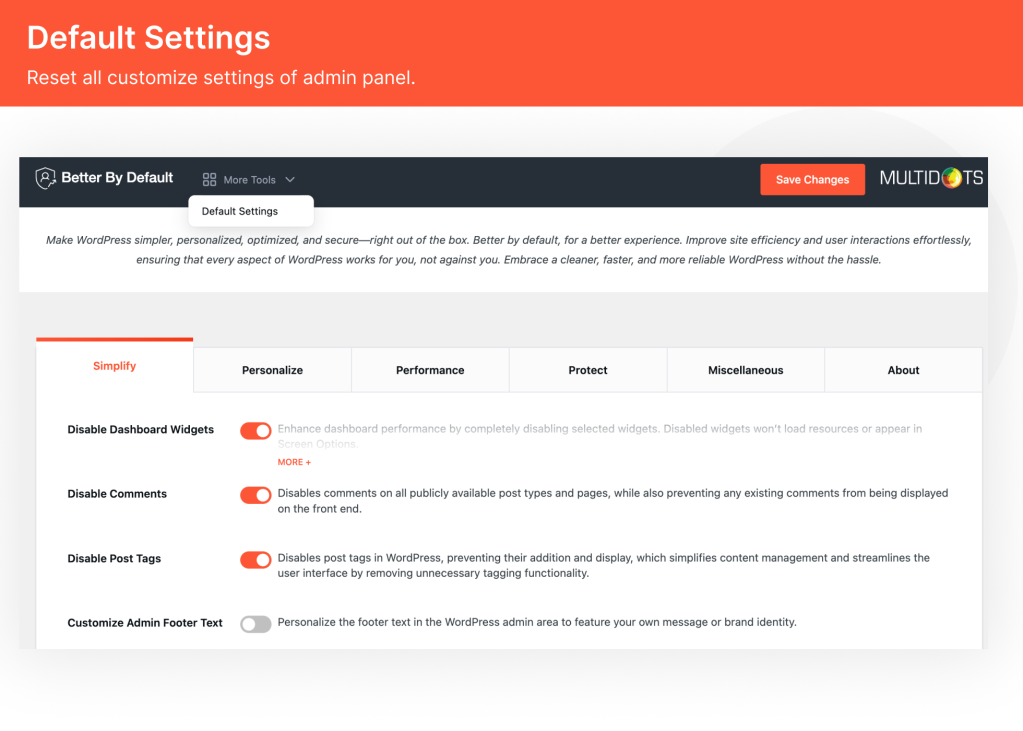
Admin Panel – Better By Default
This is useful for:
- Testing configurations
- Client handovers
- Troubleshooting
- Reverting changes safely
No settings are permanent unless you choose them to be.
Note: This plugin connects to Jetpack to manage site subscribers. It sends the site ID when checking subscriber data and redirects users for management.
Installation and Setup
Getting started with Better By Default is straightforward:
- Upload the better-by-default folder to the
/wp-content/plugins/directory. - Activate the plugin through the ‘Plugins’ menu in WordPress.
- Navigate to the settings page ‘Better By Default’ to customize options.
Most options are pre-configured, so minimal setup is required.
Summary
Better By Default improves WordPress by fixing what most sites change anyway.
It simplifies the admin interface, improves security defaults, removes unnecessary features that impact performance, and allows meaningful personalization—all from a single, well-structured plugin.For site owners, teams, and agencies, it provides a cleaner, safer, and more efficient WordPress experience. Check out the plugin live preview now.
